IMPLEMENTATION / ROLE-BASED PROFESSIONAL TRAINING
Emlid Setup, Training and Workflow Support in Singapore
Easepect helps teams turn Emlid hardware and software into a documented operating workflow. Training is organised around field observation, correction setup, coordinate checks, post-processing, mobile reality capture and reliable handover—not around feature lists alone.
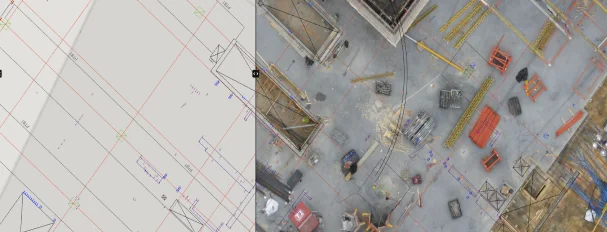
Observed data, configuration and quality evidence remain attached through handover.
01 / PRACTICAL OVERVIEW
Where Emlid setup, training and support fits in the working system.
A productive training programme starts with the team’s existing experience, project conditions and required deliverables. Surveyors, GIS operators, drone teams and construction reviewers do not need identical course content, even when they share the same receiver or correction service.
Easepect can combine product selection, initial configuration, a representative technical demonstration, role-based exercises and operating documentation. Training improves the operating process but does not confer regulated survey qualification, manufacturer certification or project acceptance.
02 / TRAINING PATHWAYS
Choose the responsibility your team needs to perform.
RTK receiver foundations
Base/rover roles, GNSS observations, correction sources, antenna height, tilt initialisation, solution status and known-point checks.
Emlid Flow field survey
Project setup, coordinate systems, codes and attributes, point/line collection, stakeout, synchronisation and CAD/GIS exports.
Emlid Studio and PPK
Raw logging, base/reference data, static and kinematic processing, Stop & Go, drone events, geotagging and solution review.
RX2 + PIX4Dcatch GPC
Compatible iOS setup, offsets, visible-surface capture, processing, checkpoint review, vectorisation and handover limits.
Base, Caster and NTRIP
Base position, RTCM output, caster and rover connections, credential handling, interruption recovery and multi-rover procedure.
Workflow assurance
SVY21 and height references, control/checkpoints, export testing, exception reporting and responsibilities for professional acceptance.
03 / IMPLEMENTATION SEQUENCE
Move from configuration to independent operation.
01 / Assess
Review current equipment, user experience, applications, correction access, project coordinates, deliverables and operational constraints.
02 / Configure
Prepare representative projects, receiver profiles, code libraries, correction connections and export templates. Credentials remain in the approved channel.
03 / Demonstrate
Show the complete workflow on a representative task, including expected failure conditions and checks—not only an ideal demonstration.
04 / Practise
Have each learner perform setup, observation, processing and handover. Review errors and repeat critical steps until the procedure is understood.
05 / Document and support
Issue an agreed operating checklist and escalation route. Plan follow-up around the first live project where appropriate.
04 / ROLE-BASED LEARNING OUTCOMES
Each role leaves with a testable task.
| Role | Practical outcome | Evidence of completion |
|---|---|---|
| Field survey operator | Configure, validate and collect corrected observations | Known-point check and coded field project |
| Construction / GIS user | Collect or stake out features and manage attributes | Checked export opened in the target workflow |
| Drone mapping operator | Record base/rover logs and camera events | Complete mission dataset and processing review |
| Processing specialist | Run PPK or photogrammetric processing and inspect quality | Solution review, checkpoint check and exception notes |
| Team administrator | Manage project templates, users and operating documents | Approved configuration and handover checklist |
05 / SUPPORT BOUNDARIES
Keep operational, manufacturer and professional issues distinct.
- Easepect implementation support
- Configuration, integration, training, representative testing and agreed follow-up for the deployed workflow.
- Manufacturer escalation
- Product defects, firmware and vendor-specific issues are routed through the appropriate support process with logs and system information where required.
- Professional survey responsibility
- Regulated work, certified drawings and formal acceptance remain with the appropriately qualified responsible parties.
- Security and confidentiality
- Do not send NTRIP passwords, subscription tokens, sensitive site information or restricted project material through the general enquiry form.
06 / BOOKING A SESSION
Bring a workflow question, not necessarily a model number.
Tell us your application, team size, current experience, operating environment and required deliverables. If you already own equipment, include the model and current workflow; if not, Easepect can help identify a suitable hardware and software route first.
A quotation can combine equipment, accessories, demonstration, configuration and training where required. Exact commercial scope, timing and any manufacturer support arrangements are confirmed before booking.
07 / FREQUENTLY ASKED QUESTIONS
Before choosing Emlid setup, training and support.
Yes. The session can begin with GNSS, corrections, coordinate systems and field observation before moving into the selected receiver and deliverable workflow. Content and pace are adapted to the team.
Easepect can support the NTRIP configuration and known-point validation process where the customer has an appropriate valid subscription and credentials. Credentials are handled through an approved operational channel, not the website form.
It can. A combined module covers RX2, compatible iOS setup, corrections, offsets, visible-surface capture, PIX4D processing, checkpoints and CAD/GIS handover, including what GPC cannot detect or replace.
No. Easepect technical training addresses equipment and workflow competence. It does not confer regulated survey qualification, manufacturer certification or authority to certify project work.
Legacy setup and migration questions can be assessed as support work. Older models are not presented as the current flagship range, and compatibility should be checked against current software and firmware documentation.
LOCAL IMPLEMENTATION / SINGAPORE
Not sure which Emlid receiver suits your project?
Tell us what you are surveying, your operating environment and required deliverables. Model selection is optional; Easepect can help identify a suitable hardware and software workflow.